Gate Entry Sets the Tone for Your Entire Event
The first five minutes of an attendee's experience often determine how they feel about the rest of the day. Long lines, confused staff, or scanners that won't connect turn anticipation into frustration before anyone reaches the stage.
For high-volume events (festivals, multi-day concerts, fairs, and large attractions), gate entry isn't a minor operational detail. It's a chokepoint that affects crowd flow, security, staffing costs, and attendee satisfaction. Getting it right requires planning, the right hardware, and software that works when connectivity doesn't.
This guide covers the practical decisions you'll face: choosing scanning hardware, handling offline scenarios, managing re-entry, deciding between wristbands and mobile tickets, and using real-time data to adjust on the fly.
Choose Scanning Hardware That Handles Volume
Consumer-grade phones can scan tickets, but they weren't built to do it thousands of times per hour in direct sunlight with gloved hands. For high-volume gates, you need hardware that's fast, reliable, and easy for temporary staff to operate.
Key considerations when selecting scanners:
- Scan speed and accuracy. Look for devices that can read QR codes and barcodes in under a second, even on cracked screens or at odd angles. Slow scans compound into long lines.
- Battery life. A scanner that dies mid-shift creates a bottleneck. Plan for 8+ hours of continuous use, or have a rotation system for charging.
- Durability. Gates are chaotic. Devices get dropped, rained on, and handed off constantly. Rugged cases and enterprise-grade hardware pay for themselves.
- Ease of use. Your gate staff may have 20 minutes of training. The interface should be obvious enough that they can troubleshoot without calling a supervisor.
Big Tickets' scanning app runs on iOS and Android devices, including both smartphones and dedicated handheld scanners. The app supports QR codes, barcodes, and mobile wallet passes (Apple Wallet, Google Pay), with instant duplicate detection to prevent ticket sharing.
Plan for Offline Scanning
Connectivity fails at the worst times. Rural venues, underground parking structures, and overcrowded festival grounds all create dead zones. If your scanning system requires a live internet connection, a single tower outage can halt your entire entry operation.
Offline scanning solves this by downloading your ticket database to each device before gates open. Scanners validate tickets locally, then sync back to the server once connectivity returns. The tradeoff: offline mode can't detect tickets that were refunded or transferred after the download, so you'll want to sync as close to gate time as possible.
Big Tickets supports full offline scanning with automatic background sync. When a device reconnects, it uploads all scan data and pulls any ticket changes (refunds, transfers, upgrades) without manual intervention.
Handle Re-Entry Without Creating a Second Box Office
Multi-day festivals, events with off-site parking, and venues with external food options all need re-entry systems. Without one, you're either trapping attendees inside or creating a security gap.
The simplest approach is scan-based re-entry: the same ticket that got someone in can get them back in, with the system tracking that they've already entered and left. This works well for single-day events where re-entry is occasional.
For multi-day events or high-volume re-entry, consider physical credentials (wristbands, stamps, or hand stamps) that can be checked visually without scanning. This speeds up the re-entry line and reduces device dependency.
Big Tickets supports both models. The scanning app tracks entry and exit timestamps, and you can configure re-entry rules per ticket type (unlimited, once per day, or no re-entry). For events using wristbands, we integrate with RFID providers for tap-based entry.
Wristbands vs. Mobile Tickets: When to Use Each
There's no universal answer here. The right choice depends on your event format, audience, and operational constraints.
Mobile tickets work well when:
- Your audience skews younger and tech-comfortable.
- You want to reduce physical credential costs and waste.
- Transfers and last-minute purchases are common.
- You're running a single-day event with minimal re-entry.
Wristbands work well when:
- You're running a multi-day event where attendees need constant access verification.
- Re-entry volume is high (camping festivals, events with external vendors).
- You want visual differentiation for access levels (GA, VIP, backstage, 21+).
- Phone battery and connectivity are concerns.
Many event organizers use a hybrid model: mobile tickets for general admission, wristbands for VIP and multi-day passes. This balances convenience for the majority with durability for premium and extended-access credentials.
Use Real-Time Data to Manage Gates
Once gates open, you need visibility into what's happening across all entry points. Which lanes are backed up? How many people are inside? Is the VIP entrance underutilized while GA is slammed?
Real-time dashboards answer these questions as they happen, not hours later in a post-event report. With live data, you can:
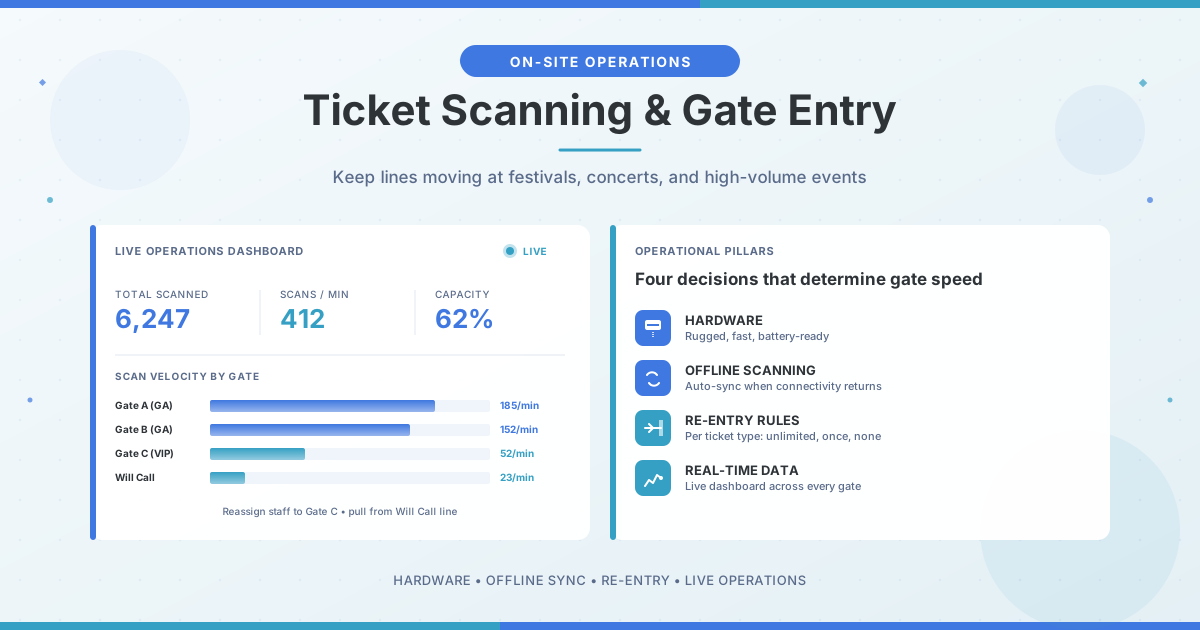
- Rebalance staffing. Move workers from slow gates to busy ones without guessing.
- Open overflow lanes. If scan rates drop below a threshold, you know it's time to add capacity.
- Monitor for anomalies. A sudden spike in duplicate scan attempts might indicate a ticket-sharing problem at a specific gate.
- Track attendance against capacity. Know when you're approaching venue limits before it becomes a safety issue.
Big Tickets provides a live operations dashboard that shows scan counts, entry velocity, and device status across all gates. You can filter by ticket type, time window, or entry point to drill into specific questions.
One example of what this looks like in practice: a large-scale concert tour using Big Tickets scanned more than 6,000 tickets in the first 15 minutes of gates opening, with the live dashboard allowing operations staff to monitor every gate and reassign workers on the fly as traffic patterns shifted.
Train Staff for the Exceptions, Not Just the Happy Path
Most scans are straightforward: ticket appears, scanner beeps green, attendee walks through. But gate staff need to know what to do when things go wrong.
Build training around common exceptions:
- Invalid ticket. Is it a refund, a duplicate, or a wrong event? Staff should know how to check and what to tell the attendee.
- Device issues. Battery died, app crashed, won't connect. Have a backup plan and make sure everyone knows it.
- Will-call pickups. Where do attendees go if their ticket didn't transfer correctly? Who has authority to issue replacements?
- Accessibility needs. How do you handle attendees who need assistance, have service animals, or require ADA accommodations?
The goal isn't to script every scenario. It's to give staff enough context that they can solve problems without escalating everything to a supervisor.
The Bottom Line
Gate entry is where operations meets attendee experience. A smooth entry process is invisible: people walk in, find their friends, and start enjoying the event. A bad one creates stories that overshadow everything else you got right.
The fundamentals: choose hardware that handles volume, plan for offline scenarios, design re-entry around your event format, and use real-time data to adapt. Get those right, and your gates become a competitive advantage instead of a liability.
Ready to Run a Smarter Event?
Big Tickets helps festivals, fairs, concerts, and live events sell more tickets, streamline operations, and deliver a better attendee experience. No subscriptions, no setup fees.
Request a Demo